
SuitonX Academics
From academic planning to measurable outcomes.
Connect curriculum, courses, faculty teaching, attendance, learning activities and academic outcomes through one institutional workflow.


Academic structure
Built on the structure your institution already runs.
Everything academic in SuitonX hangs off one hierarchy. Set it up once and timetables, lesson plans, attendance, assessments and outcome mapping all work inside it.
01
Institution
Departments and governance
02
Program
Degree a student enrols in
03
Scheme
Curriculum version or regulation
04
Semester
Teaching term
05
Course
Subject, code and credits
06
Section
Class group
07
Faculty
Assigned to course and section
08
Students
Enrolled in the section
Academic master: configured for the institution
People: assigned within the structure
What builds on it
- Timetables
- Lesson plans
- Attendance
- Assessments
- Outcome mapping
- Dashboards
The academic master
Programs, semesters, courses and sections are set up once for the institution, and the same definitions appear wherever they are used. A course code means the same thing on a faculty member's course list, a student's subject list and the principal's academic view.
See where Academics sits in the platform- Programs
- Counted on the principal's and management dashboards
- Semesters
- Shown on courses, classes and lesson plans
- Courses
- Code and credits on faculty and student screens
- Sections
- The class group a timetable slot and lesson plan belong to
- Faculty assignment
- Each faculty member's own course list
- Academic calendar
- An area of the college administration workspace
Teaching & learning
Give faculty one place to manage teaching.
Courses, lesson plans, attendance, assignments, quizzes and internal assessments sit in one faculty workspace, on the web and on the phone.
01
Start the day
Today's classes with section, room and the planned topic.
02
Teach
Open the course workspace or the lesson for that class.
03
Record
Mark attendance from the scheduled class. Evaluate submissions.
04
Track
Delivery progress for every course, against its lesson plan.
05
Improve
Pending evaluation, internal marks and academic-quality work in one queue.

Lesson plans
Plans that show where teaching actually is.
A lesson plan in SuitonX is not a document filed at the start of term. Faculty teach from it, and its progress is visible to the department and the principal while the semester is running.
Course
A plan is created for each course and section in the semester.
Modules and topics
Generated from the imported academic content for that course.
Planned teaching
Each class on the timetable shows the topic planned for it.
Actual progress
Delivered hours are tracked against planned hours.
Academic visibility
Delivery against plan appears on the principal's academic view.


Student learning
Students see their semester in one place.
The Student LMS puts subjects, work due, attendance and learning material on one screen, organised by the same courses and sections faculty teach.

- Subjects
- Each subject with its faculty, credits and progress.
- Work due
- Assignments and quizzes with their due dates.
- Attendance
- Overall standing, and subject-wise detail.
- Learning
- Learning materials, previous papers and where to continue.
- Announcements
- Notices posted by faculty for the class.
- Schedule
- Today's classes and the timetable, on the web and phone.
Attendance
Attendance connected to the academic context.
Attendance is taken against the class on the timetable, so it already knows the course, section, faculty member and planned topic. The same record reaches the student, the parent and the department.
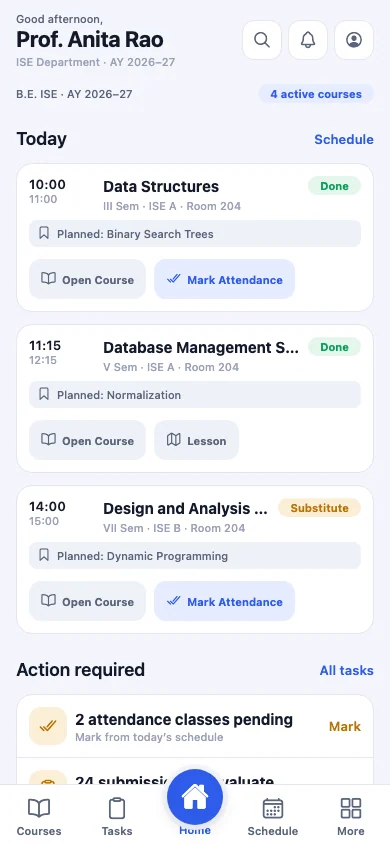
01 · Faculty
Marks attendance from today's class
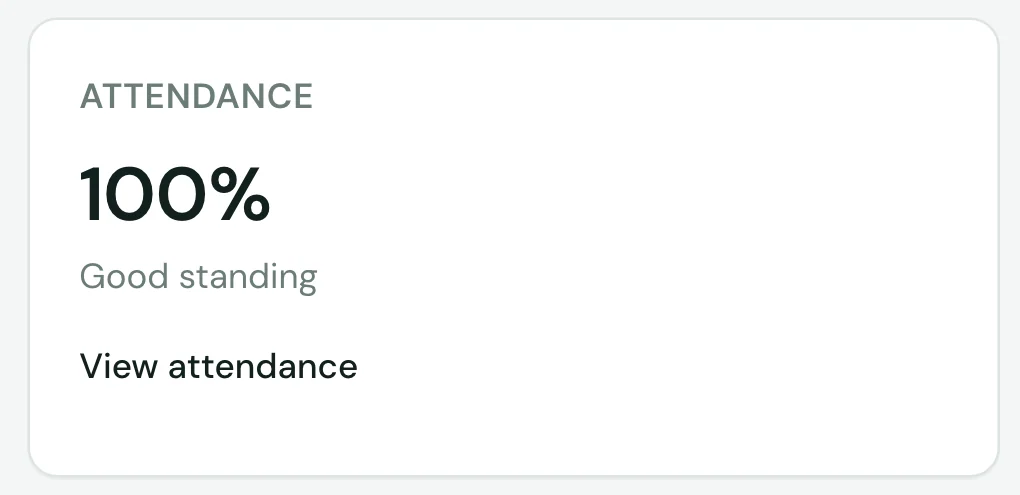
02 · Student
Sees their standing on the dashboard
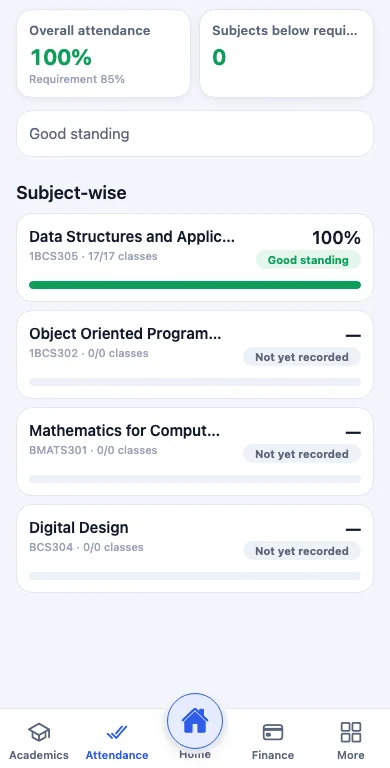
03 · Parent
Sees subject-wise attendance and shortages


- Subject-wise
- Every percentage belongs to a course and section.
- Marked from the class
- Faculty mark attendance from the scheduled class.
- Against the requirement
- Standing is measured against the institution's minimum.
- Shortage visible
- Parents see the subjects below the requirement. Students see their own standing.
Leadership sees the same signal at a higher level: heads of department see student attendance for their department, and low attendance in a department appears as an alert in the management workspace.
Outcome-based education
Connect teaching to outcomes.
Each course defines its course outcomes. SuitonX maps them to program outcomes, and to PSOs and SDGs where the institution defines them, ties assessment questions to them, and tracks attainment status, so outcome work follows the teaching instead of being assembled at the end of the year.
Course
One subject in the curriculum
Code, credits, faculty and section
- CO1
- CO2
- CO3
- CO4
- CO5
- POProgram OutcomesWhat every graduate of the program should be able to do.
- PSOProgram Specific OutcomesWhere the institution defines outcomes particular to the program.
- SDGSustainable Development GoalsWhere the institution tracks a course's contribution to the UN goals.
Outcome status sits on every course.
On the faculty dashboard each course shows its lesson plan, active assessments, outcome mapping and gap analysis side by side. Academic Mapping, CO Evaluation, Gap Analysis and Attainment & Improvement have their own place in the faculty navigation.
When an item is not started, the product says so. That makes missing outcome work visible early rather than at accreditation time.


From curriculum to improvement
01
Curriculum
The subjects each batch studies
02
Course
Course outcomes attached to the course
03
Teaching
Lesson plans and delivery progress
04
Assessment
Assignment and quiz questions tagged to course outcomes
05
Outcomes
CO mapping to POs, and to PSOs and SDGs where defined
06
Attainment
CO attainment status for each course
07
Improvement
Gap analysis and beyond-syllabus plans
Gap analysis feeds the next cycle of teaching.
SuitonX organises outcome evidence for the institution. Attainment targets, accreditation submissions and the decisions that follow remain with the institution.
Academic visibility
See academic progress before the semester is over.
Principals and heads of department see teaching, assessment and outcome status while the semester is running, built from the work faculty are already doing.

What the principal's academic view shows
- Course delivery against the lesson plan
- Examination readiness for upcoming assessments
- CO attainment status by course
- Departments that need attention
- Pending actions and approvals

Parents
Parents see the academic picture for their child.
The parent app shows what needs attention, attendance against the requirement, shortage subjects, published results and fees for one student, from the same records faculty and the institution maintain.

Bring your academic workflows into one connected platform.
See programs, courses, lesson plans, attendance and outcome mapping working together in a SuitonX walkthrough.