Skip to content
SuitonXRequest Demo

SuitonX Intelligence

See the institution, not just the records.

SuitonX brings academic and operational information into role-aware views, so institutional leaders and teams can understand what requires attention without manually combining information from disconnected systems.

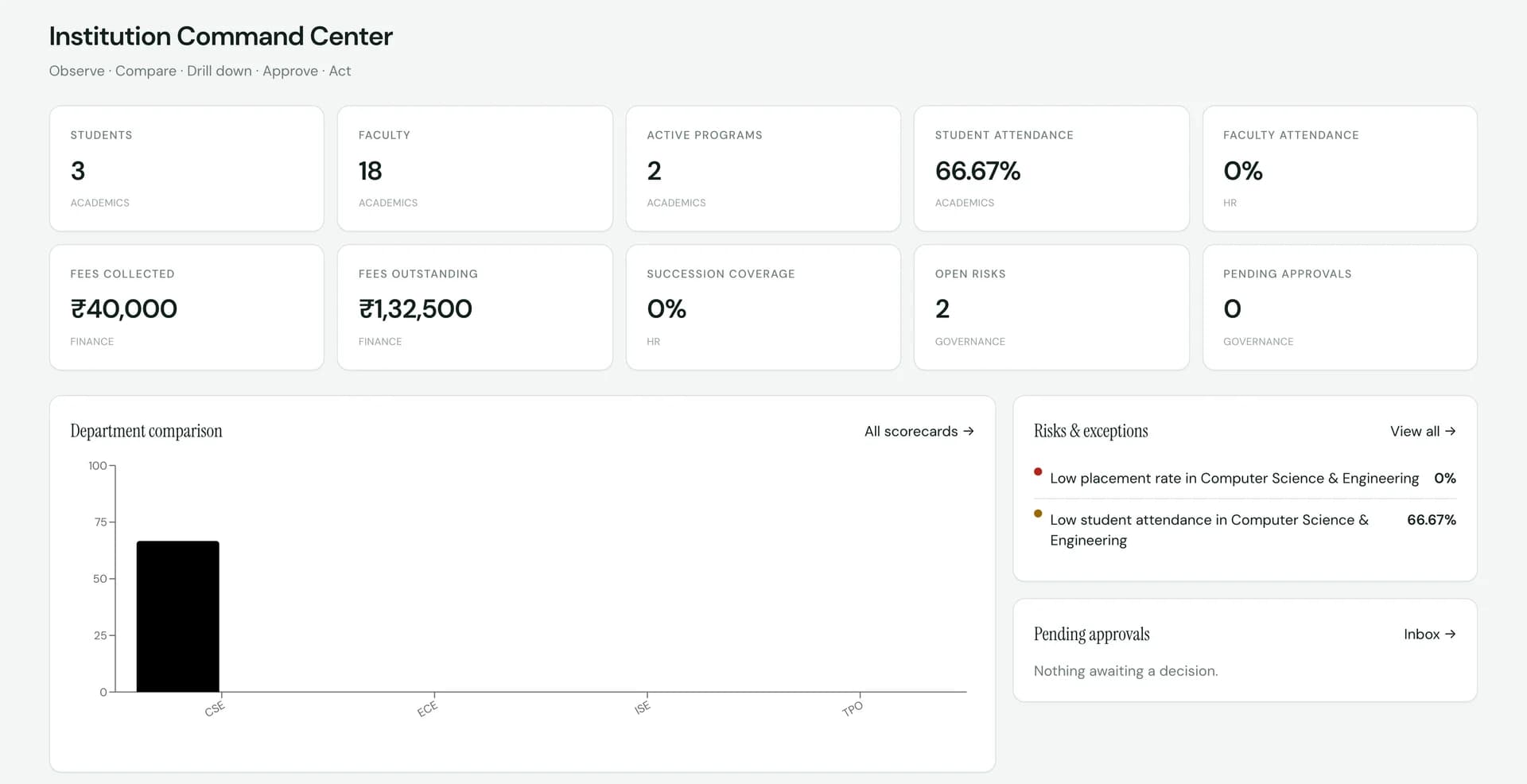
SuitonX Institution Command Center: academic, finance, HR and governance indicators, a department comparison chart, a risks and exceptions list, and a pending approvals inbox
Institution Command Center, captured from the SuitonX product. Figures shown are demonstration data, not customer results.

What intelligence means here

Connected visibility. Not a prediction engine.

In SuitonX, intelligence means role-aware dashboards, rule-based attention flags and reports drawn from live institutional records. It does not forecast outcomes, and it does not make decisions for you.

  • Built from working records

    Dashboards read the same academic, finance, HR and campus records your offices work in. There is no separate reporting copy to reconcile.

  • Every flag states its rule

    Attention items such as low attendance or a low placement rate show the reason, the measured value and the threshold that raised them.

  • People make the decisions

    SuitonX shows what needs attention and who is responsible. Approvals and actions stay with the authorised role.

Leadership intelligence

Two leadership views, built for two different jobs.

Management needs the whole institution in one place. The principal needs to run its academic life. SuitonX gives each a different screen, with different permissions behind it.

SuitonX Institution Command Center: academic, finance, HR and governance indicators, a department comparison chart, a risks and exceptions list, and a pending approvals inbox
Institution Command Center. Demonstration data.

Management

The whole institution on one screen.

  • Academic, finance, HR and governance indicators together
  • Department comparison with drill-down to scorecards
  • Risks and exceptions across academics, finance, HR, placement and campus
  • Pending approvals and executive reports with snapshot export

Management has institution-wide visibility. Acting on approvals is granted explicitly rather than assumed, and individual salary detail stays restricted.
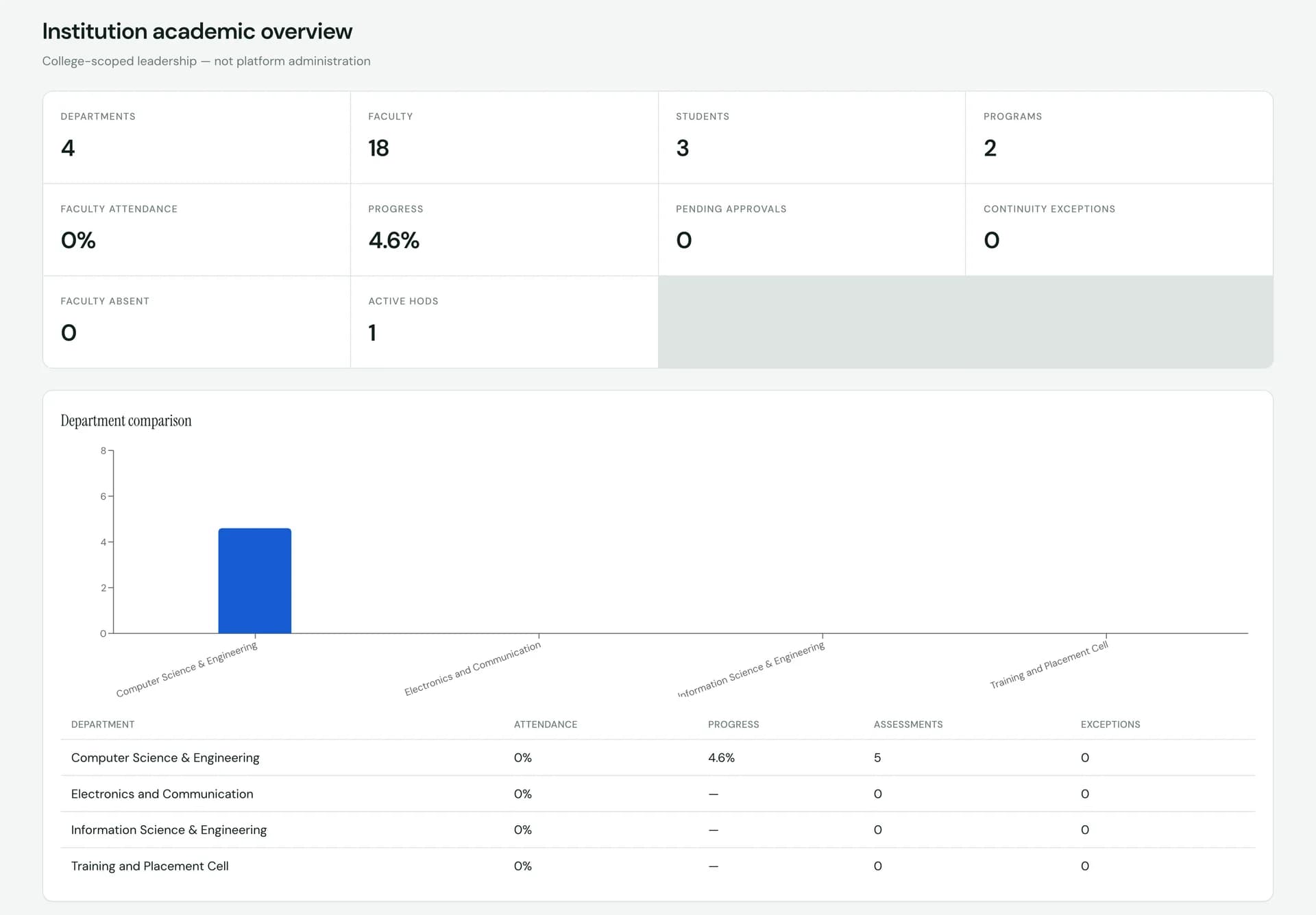
SuitonX principal institution academic overview: departments, faculty attendance, academic progress, pending approvals and continuity exceptions, with a department comparison of attendance, progress, assessments and exceptions
Institution academic overview. Demonstration data.

Principal

The academic life of the college, department by department.

  • Departments, faculty, students, programmes and active HODs
  • Faculty attendance, absence and academic progress
  • Continuity exceptions when teaching cover is at risk
  • Department comparison of attendance, progress, assessments and exceptions

The principal acts on approvals routed through academic leadership, such as leave and recruitment. The view is scoped to the college, not to platform administration.

Academic intelligence

Understand academic progress while there is still time to act.

Teaching progress, attendance and assessment activity are visible during the semester, at the level each person is responsible for. These are thresholds and progress measures, not predictions.

Outcome-based education workspaces, including CO evaluation, attainment and gap analysis, sit in the same academic system. See Academics.

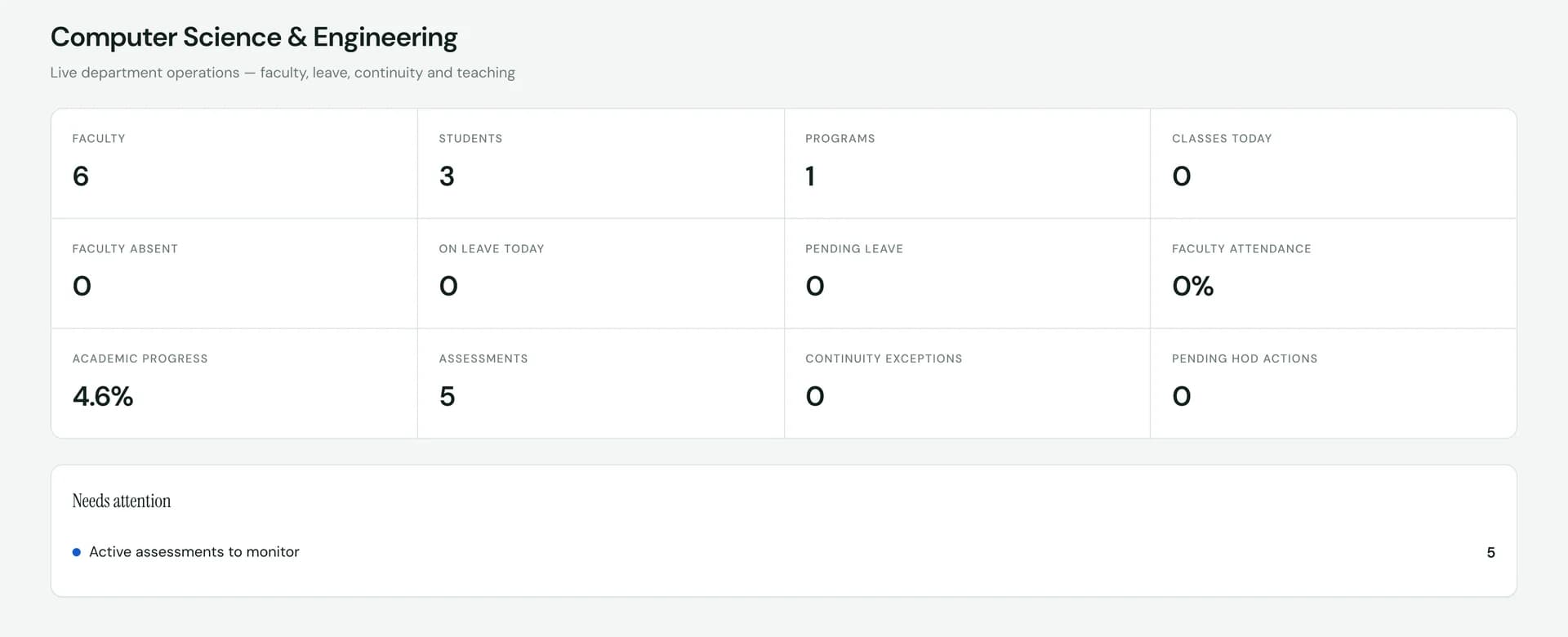
SuitonX head of department view: faculty, students, faculty absence and leave, academic progress, assessments, continuity exceptions and pending HOD actions, with a needs-attention list
Head of department view of one department. Demonstration data.
  • Teaching progress

    Lesson plans track teaching hours. Progress rolls up to the department and the principal's overview.

  • Attendance against your threshold

    Attendance is measured against the institution's minimum. Mentors see shortage course by course, and parents see shortage subjects on mobile.

  • Mentoring attention, with reasons

    Mentees are flagged by rule: attendance, assessment results or overdue work. Each flag shows why it was raised.

  • Department continuity

    HODs see faculty absence, leave, active assessments and continuity exceptions before classes go uncovered.

Operational intelligence

Operational visibility where each office already works.

Each office workspace shows its own counts and queues, and the command center brings the leadership-level summary together. Depth differs by module, so each one is described only as far as the product shows it.

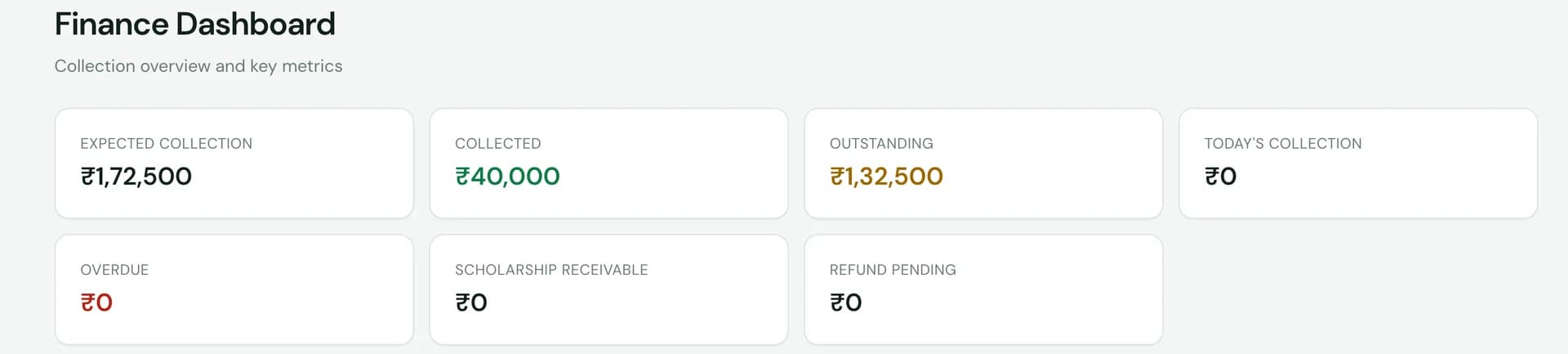
SuitonX finance dashboard counters for expected collection, collected, outstanding, today's collection, overdue, scholarship receivable and refunds pending
Finance office counters. Demonstration data.
Finance
Expected collection, collected, outstanding, overdue, scholarship receivable, refunds pending and recent payments.
Examinations
Readiness across timetable, eligibility, rooms, seating, invigilators, question papers and marks, plus marks-sheet lock status.
HR
Workforce, leave, recruitment and separation views in the HR office. Leadership reads summaries.
Hostel
Pending allocations, leave and outing requests, overdue returns, complaints, no-dues, visitors and occupancy.
Transport
Routes, fleet, passes, trips and complaints. Live vehicle tracking is not part of the current product.
Facilities & IT
Raised requests, assigned work and a central queue measured against service targets.

Role-based dashboards

Same institution. Different responsibilities. Different dashboards.

Role-based dashboards are a core SuitonX design principle. Each person sees the scope they are accountable for, and the server enforces that scope, not just the menu.

Institutional perspective

Board-level visibility across academics, finance, people and governance.

Sees
  • Institution-wide indicators
  • Department comparison
  • Risks and exceptions
  • Executive reports
Acts on
  • Reviews the approvals inbox
  • Exports the institutional snapshot
Outside this view
Individual salary detail, and acting on approvals unless that is explicitly granted.

Scope of this dashboard: institution

From data to action

The right person sees the issue, with the reason attached.

SuitonX does not make the decision. It makes sure the responsible person sees what needs attention, inside their own scope, early enough to act.

  1. 01

    Institutional activity

    Classes are taught, attendance is marked, fees are paid, requests are raised.

    Example: A student's attendance in one course falls.

  2. 02

    Connected visibility

    The records land in one system, so academic and operational views read the same data.

    Example: The figure appears in the course, mentoring and department views.

  3. 03

    Attention required

    A rule compares the value to the institution's threshold and raises a flag with its reason.

    Example: Flagged below the minimum attendance threshold.

  4. 04

    Responsible role

    The flag reaches the role accountable for it, within that role's scope.

    Example: The mentor and the HOD see it. Other departments do not.

  5. 05

    Action

    A person decides what to do and records it in the workflow.

    Example: The mentor follows up and records the intervention.

Reporting

Stop rebuilding the same institutional picture in spreadsheets.

Reports come from the same records as the dashboards, so the governing body, the principal and the offices start from the same numbers.

  • Executive reports by permission

    Institutional snapshot, academic performance, HR workforce, recruitment, placement, fee collection and campus services. Each report opens only for roles that hold its permission.

  • Snapshot export with sources

    The management snapshot exports to CSV. Each figure keeps its source area, and figures with no underlying records are marked as no data rather than shown as zero.

  • Office-level exports

    Timetables export to CSV. Quiz results and CO evaluations export to spreadsheets for the people who work with them.

Reports support governance and accreditation work. They do not file regulatory or accreditation returns on your behalf.

Turn institutional information into institutional visibility.

See the command center, the principal's overview and the department views working on one connected set of records.