Skip to content
SuitonXRequest Demo

SuitonX Mobile

Your campus. In everyone's pocket.

SuitonX gives each person a phone home built around their own tasks: the teaching day for faculty, a student's standing for parents, decisions for the principal, learning for students, and community for alumni. It is not the desktop ERP shrunk onto a phone.

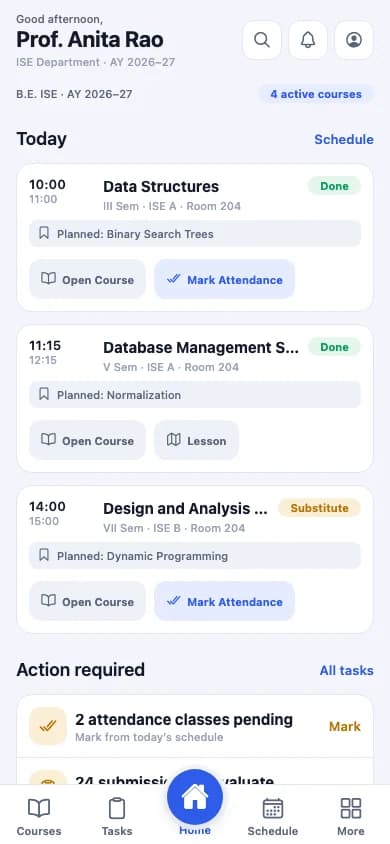
SuitonX faculty mobile home: today's classes with planned topics and Mark Attendance buttons
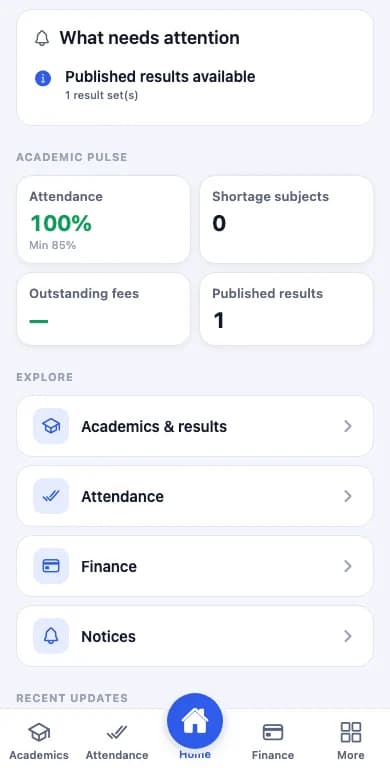
SuitonX parent mobile home: what needs attention, attendance, shortage subjects, outstanding fees and published results
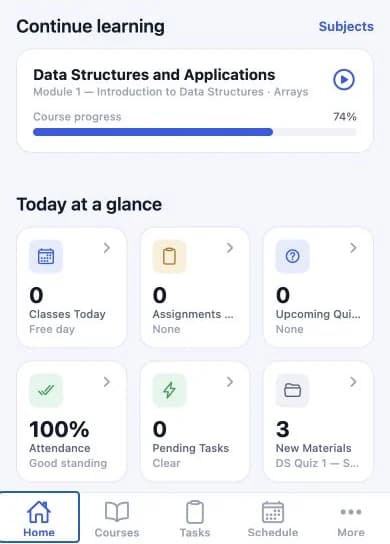
SuitonX student mobile home: continue learning with course progress, and classes, assignments, quizzes, attendance, tasks and new materials at a glance

Faculty, parent and student phone homes, captured from the SuitonX mobile app. Demonstration data.

How SuitonX approaches mobile

Built per role
Each phone opens on that role's work. A parent never wades through a faculty menu.
The same institution
Phones work from the same institution's records as the web workspaces, scoped to the signed-in role.
Shown as captured
Every phone on this page is a capture from the SuitonX mobile app, cropped and never redrawn.

Five roles on the phone

Each phone opens on that person's work.

These are the roles with a clean capture of their phone experience. Each links to the full role page.

SuitonX faculty mobile home: today's classes with planned topics and Mark Attendance buttons

Faculty mobile home. Demonstration names and data.

Faculty

The teaching day.

Today's classes in order, each with the planned topic, Open Course, and Mark Attendance or Lesson. Substitute classes are labelled. An Action required list and the full task queue sit below.
SuitonX for Faculty

SuitonX parent mobile home: what needs attention, attendance, shortage subjects, outstanding fees and published results
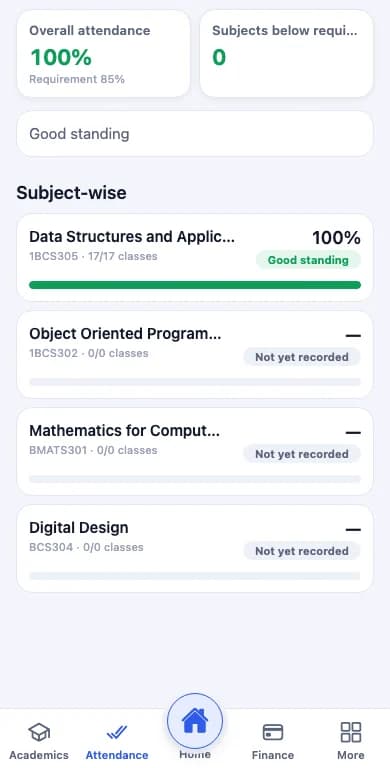
SuitonX parent mobile attendance screen: overall attendance against the requirement, subjects below requirement, and subject-wise attendance

Parent home and attendance, shown below the student's name and ID. Demonstration data.

Parent

A student's standing.

What needs attention first, then attendance against the minimum, shortage subjects, outstanding fees and published results. Academics and results, Attendance, Finance and Notices are one tap away.

SuitonX for Parent

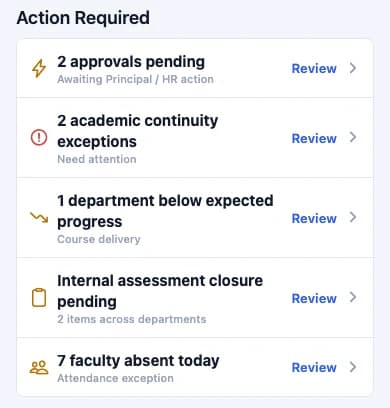
SuitonX principal mobile home, Action Required: pending approvals, academic continuity exceptions, a department below expected progress, internal assessment closure and faculty absence, each with a Review action

Principal mobile home, cropped to the Action Required list. Demonstration data.

Principal

Decisions, not dashboards.

The principal's phone opens on Action Required: pending approvals, continuity exceptions, a department below expected progress, assessment closure and faculty absence, each with Review.

SuitonX for Principal

SuitonX student mobile home: continue learning with course progress, and classes, assignments, quizzes, attendance, tasks and new materials at a glance

Student mobile home, shown from Continue learning down. Demonstration data.

Student

Learning, at a glance.

Continue learning returns to the current course and module with progress. Classes, assignments, quizzes, attendance, tasks and new materials sit below, with Courses, Tasks and Schedule in the bottom navigation.

SuitonX for Student

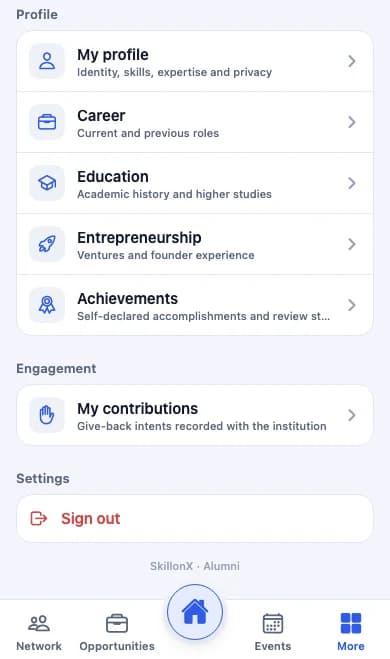
SuitonX alumni mobile app, More screen: profile, career, education, entrepreneurship, achievements and contributions, with Network, Opportunities and Events in the bottom navigation

Alumni app, More screen, shown below the profile card.

Alumni

Community after graduation.

Alumni keep their profile, career, education, entrepreneurship, achievements and contributions, and reach the verified directory, opportunities and events from the bottom navigation.

SuitonX for Alumni

Web workspaces

Campus offices run on the web.

Examinations, HR, finance, hostels and transport are desk work with queues, imports and approvals. SuitonX gives these offices web workspaces. No phone is shown or claimed for them.

Also in the product, not pictured

Heads of department and management have their own phone homes. They are not pictured here because the captured screens carry demonstration counts that could be read as real figures.

Scope, stated plainly

What this page does not claim

Web and mobile parity
Phones carry each role's daily tasks. This page does not claim that every web workflow is available on the phone.
App stores and distribution
App-store availability and how the app is distributed to an institution's users are not stated on this page.
Offline and notifications
Offline use and push notification behaviour are not claimed.
Captures
Screens were captured from the mobile app at phone width. Names and figures in them are demonstration data.

Put each role's work in their pocket.

See the faculty, parent, principal, student and alumni phone experiences alongside the web workspaces they connect to.