Skip to content
SuitonXRequest Demo

SuitonX Examinations

Bring examination operations into one controlled workflow.

Coordinate readiness, registration, university data imports and marks control in one connected workspace for the examination office, instead of disconnected spreadsheets and manual hand-offs between sections.

COE workspace
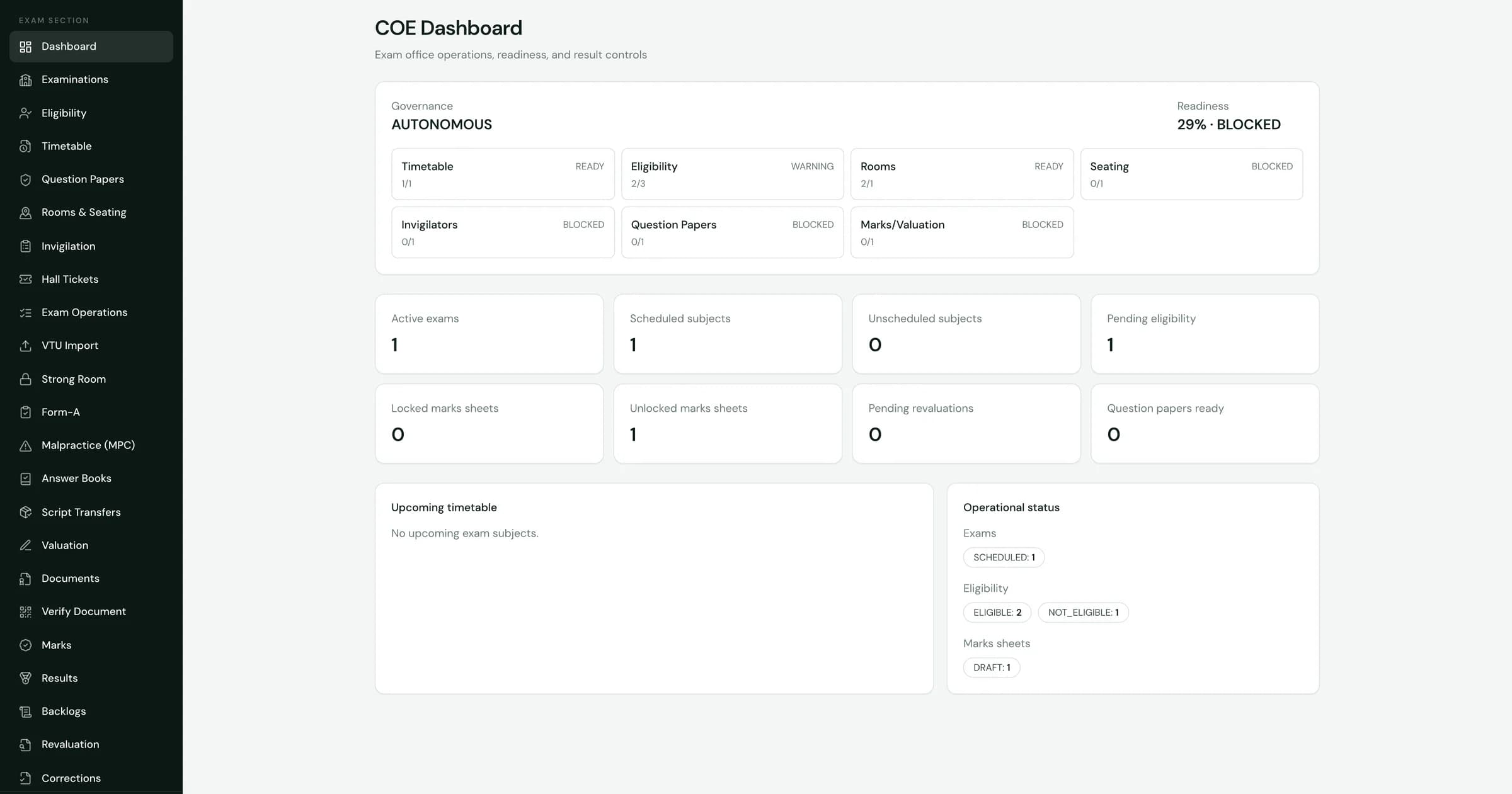
SuitonX controller of examinations workspace: autonomous governance, readiness across timetable, eligibility, rooms, seating, invigilators, question papers and marks, with exam and marks-sheet counters

Controller of Examinations workspace, captured from the product. Figures are demonstration data.

Autonomous and affiliated

Built around how your institution conducts examinations.

Autonomous colleges run their own examination cycle. Affiliated colleges work to a university's schedule and data. The COE workspace has surfaces for both, and we confirm which of your processes it covers before you commit.

Autonomous institutions

Institution-managed examination workflows

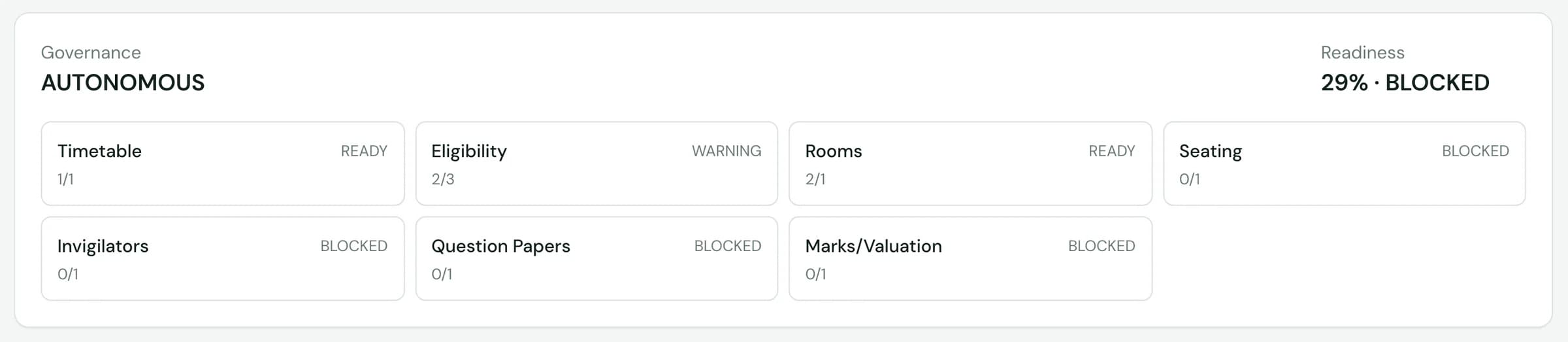
  • The COE dashboard records the institution's governance as Autonomous and tracks readiness for its own examination cycle.
  • Timetable, eligibility, rooms, seating, invigilators, question papers and marks each report a ready, warning or blocked state.
  • Revaluation, corrections and backlogs are destinations in the same workspace.
Affiliated and VTU-oriented institutions

University-issued data, handled through an import workflow

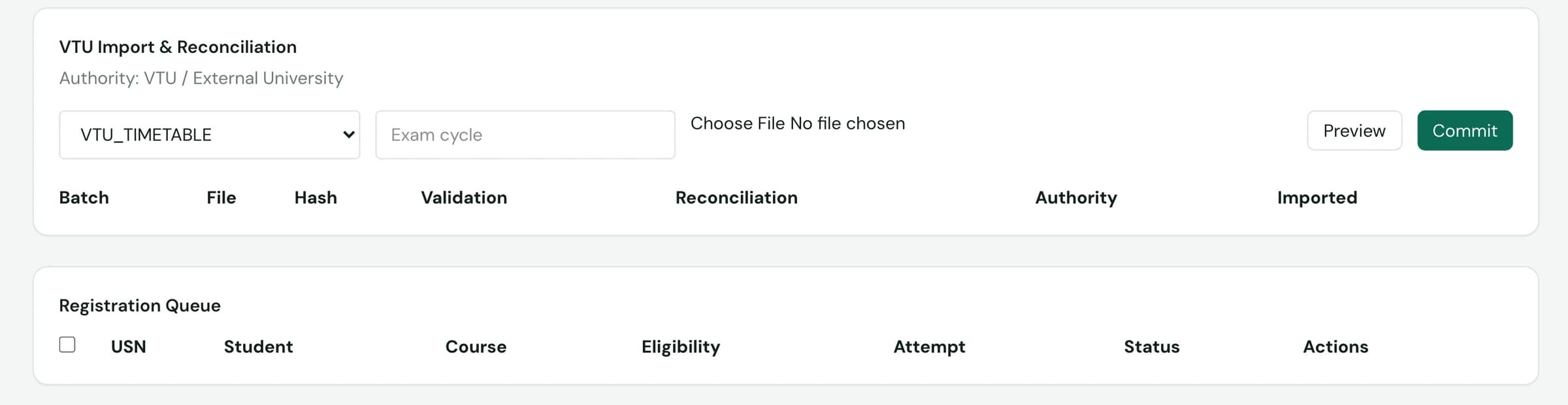
  • Exam operations includes a VTU import and reconciliation panel. The file type captured in the product is a VTU timetable.
  • Files are previewed before they are committed, and each batch keeps its validation and reconciliation record.
  • A registration queue lists students by USN, course, eligibility, attempt and status.

Coverage differs by university and by workflow. VTU is the university format shown in the product today. Other formats are a scoping question, not a claim on this page.

COE workspace

See examination readiness before exam day, not on it.

The controller of examinations opens one dashboard: the governance model, readiness across every preparation area, and the counters that show what is still pending.

COE readiness panel: governance reads Autonomous, with ready, warning and blocked states for timetable, eligibility, rooms, seating, invigilators, question papers and marks or valuation
COE counters for active exams, scheduled and unscheduled subjects, pending eligibility, locked and unlocked marks sheets, pending revaluations and question papers ready

Details from the COE dashboard above. Demonstration data.

  1. 01

    Readiness by area

    Each preparation area reports ready, warning or blocked with a progress count, so a gap is visible without calling each section.

  2. 02

    Pending work, counted

    Scheduled and unscheduled subjects, pending eligibility, unlocked marks sheets and pending revaluations sit on the same screen.

  3. 03

    Current status

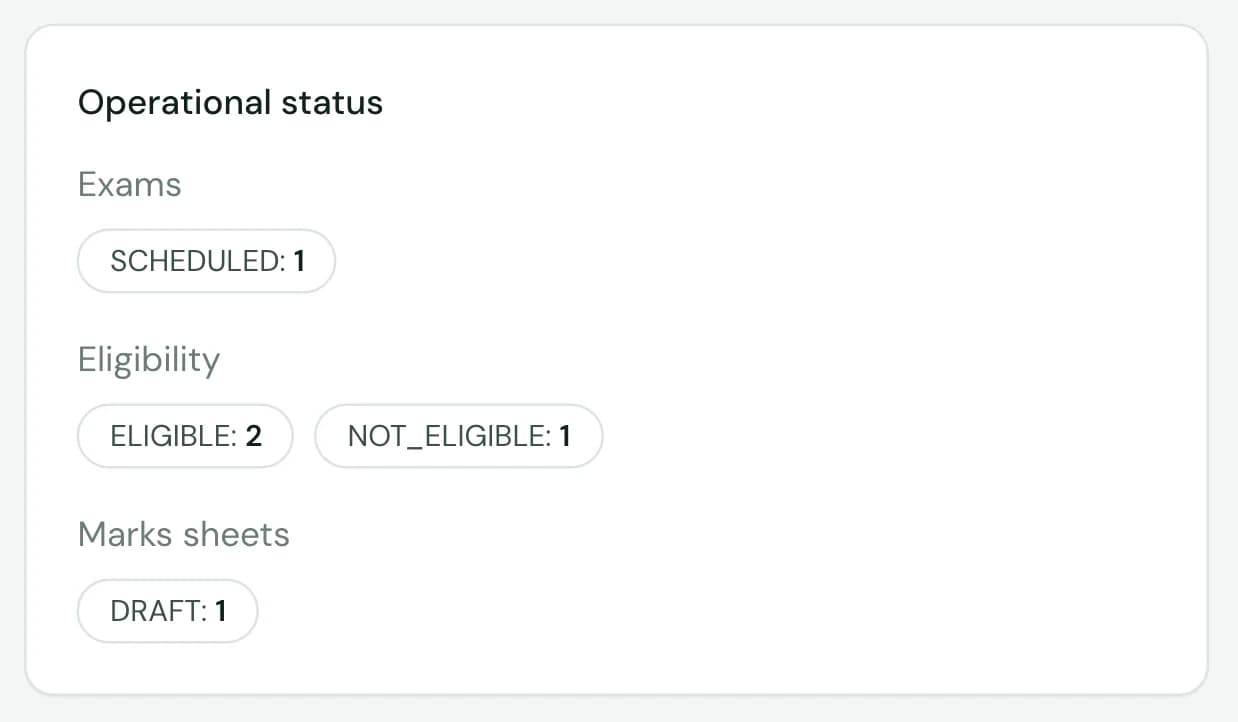
    Exams, eligibility and marks sheets show their present state as labelled chips the whole office reads the same way.

Each role sees its part of the examination

  • Examination office

    The COE workspace: readiness, registration, university imports and marks control.

  • Faculty

    Exam duties appear in the lecturer workspace, next to teaching and assessments.

  • Students

    Eligibility and hall-ticket entry points sit in the student's own workspace.

Examination journey

Five stages the COE workspace covers today.

Each stage maps to a screen or destination captured in the product. Result publication is deliberately not on this list. The scope note below explains why.

  1. 01Plan

    Schedule and prepare

    Timetable, rooms and seating, invigilators and question papers each report readiness on the COE dashboard. Scheduled and unscheduled subjects are counted, so a missing slot surfaces early.

    Evidence: COE dashboard, readiness panel

  2. 02Register

    Register and check eligibility

    The registration queue lists each student's USN, course, eligibility, attempt and status. Eligible and not-eligible counts appear on the dashboard.

    Evidence: Exam operations, registration queue

  3. 03Prepare

    Ready hall tickets

    Hall-ticket readiness is shown against eligibility, with withheld controls for students who are not cleared. The readiness view is in the product; a printed ticket layout was not captured.

    Evidence: Hall-ticket readiness screen

  4. 04Mark

    Control marks sheets

    Marks sheets are tracked as locked or unlocked, with draft status visible, so the office knows which sheets are still open before results work begins.

    Evidence: COE dashboard, marks-sheet counters

  5. 05Review

    Handle revaluation and corrections

    Pending revaluations are counted on the dashboard and revaluation requests have their own status view. Corrections and backlogs are destinations in the COE workspace.

    Evidence: Dashboard counter, revaluation status view

Registration and eligibility

Know who is cleared to sit before hall tickets go out.

Registration and eligibility live in the same workspace as the timetable and marks, so the examination office is not reconciling separate lists by hand.

Status the office can act on
Each registration carries an eligibility value, an attempt and a status, with row actions in the queue.
One count everyone reads
Eligible and not-eligible totals appear on the COE dashboard beside the rest of exam readiness.
Fewer hand-offs
Hall-ticket readiness is shown against eligibility status in the same workspace, not in a separately kept list.
COE operational status panel showing exam, eligibility and marks-sheet states as labelled chips

Operational status on the COE dashboard. Demonstration data.

VTU import workflow

University data, brought in through a reviewable import.

Affiliated colleges receive examination data from their university. SuitonX treats it as a structured import inside exam operations: chosen, previewed, committed and logged.

Exam operations
SuitonX exam operations: VTU import and reconciliation panel with file type, exam cycle, preview and commit, a batch log with validation and reconciliation columns, and the registration queue

VTU import and registration queue in exam operations, captured before any batch was committed.

  1. Step 1: Choose the import

    Select the file type, such as a VTU timetable, and the exam cycle it belongs to.

  2. Step 2: Preview before commit

    Check the file before anything is written. Committing is a separate, deliberate action.

  3. Step 3: Keep the record

    Each batch is logged with its file, hash, validation result, reconciliation state, authority and import time.

Import, not integration. This is a file import workflow, not a live or real-time connection to university systems. SuitonX is not affiliated with or endorsed by Visvesvaraya Technological University.

Marks and COE operations

Controlled marks. Traceable exam-office work.

Internal assessment starts with faculty in the academic workspace. When marks reach the examination office, the COE workspace shows which sheets are locked, which are still open, and what is waiting for review.

Working views in the product

  • COE dashboard with governance and readiness
  • Registration queue with eligibility and attempt
  • VTU import with preview, commit and batch log
  • Hall-ticket readiness against eligibility
  • Marks sheets by locked, unlocked and draft state
  • Revaluation status and pending count

Shown in a demo, not claimed here

The COE navigation also has destinations for valuation, answer-book and script custody, strong room, Form-A and malpractice cases, documents and results. The captured environment held no records in them.

We walk through their current depth in a demo rather than describe them as working examination workflows on this page.

See teaching and internal assessment in Academics

Scope, stated plainly

What this page does not claim

Result publication and grade cards
Not presented as finished workflows. The captured results screen was an empty selector, and no grade-card screen exists in the evidence.
Valuation, strong room, Form-A and malpractice
Navigation destinations with no captured records. They are not presented as production workflows.
Live university integration
VTU data arrives through the file import shown above, not a live connection.
Seating plans
Rooms and seating report readiness. A seating-plan layout was not captured, so none is pictured.
Demonstration figures
Counts in the screenshots come from a demonstration environment. They are not customer results.

Give your examination office one connected operating environment.

See the COE workspace in a SuitonX walkthrough. Tell us about your examination calendar and governance model, and we will say plainly what is ready and what is not.